Pages - Menu

Pages

Pages - Menu

Saturday, 3 November 2012

UNIVERSAL THEME PATCHER FREE DOWNLOAD


Universal Theme Patcher applies changes to Windows XPVista or 7that allow you to use unofficialthemes and change the way Windows looks.
This is a portable application, which means Universal Theme Patcher doesn't require installation, and also will run from a USB drive. When you run the EXE file, it will first tell you whether you need to apply patches to your system, then a further window opens with three areas, each with Patch and Restore buttons.
These buttons allow you to patch three specific files, which will then allow you to download and use unofficial themes. Each patch Universal Theme Patcher applies will also create a backup so you can return to the original settings whenever you want.
Universal Theme Patcher's interface does have some needless complicated information on display, which may put off beginners, but it's nothing to worry about as it's only the Patch and Restore buttons that are important.
If you want to use unofficial themes for Windows, Universal Theme Patcher is a quick and painless way to make it possible.

Universal Theme Patcher 1.5 full description

Windows does not allow you to install 3rd party themes. You have to patch some system files to be able to do so. Like UxStyle Core, Universal Theme Patcher lets you install themes on Windows 7 & Vista easily.

Universal theme patcher is a small program that patches the theme specific files in the operating system which enables the user to install 3rd party themes.

Crack uxtheme, free your Windows supports 3rd party desktop msstyle themes.

It is a universal theme patcher. Without language limited, Supports all language of windows!

The meaning of the last number of checksum:
1 - Original file, without any modification.
9 - The file has been modified.

Notes:
1, Can operate in normal mode. Do not need to enter safe mode.

2, Choose the corresponding patcher based on you Windows:
For 32bit(x86): UniversalThemePatcher-x86.exe
For 64bit(amd64): UniversalThemePatcher-x64.exe

3, Require administrator rights, UAC turn off. Right-click the exe file, select Run as Administrator.

4, XP/2003 only need to patch one file: uxtheme.dll
2008/Vista/Windows 7 6519 need to patch 3 files: uxtheme.dll, themeui.dll, shsvcs.dll
Windows 7 6801 need to patch 3 files: uxtheme.dll, themeui.dll, themeservice.dll

Sometimes, in x64 Windows, you need to patch 2 copies of files:
using UniversalThemePatcher-x64.exe to patch the 64bit files in windowssystem32;
and using UniversalThemePatcher-x86.exe to patch the 32bit files in windowssyswow64.

5, After patch, Restart computer to take effect.

6, You can run program with argument "-silent" to patch in silent mode.


                                                                                   DOWNLOAD HERE

THANK YOU

Friday, 2 November 2012

BLUE STACKS ANDROID APPLICATION FREE DOWNLOAD


BlueStacks and AMD have teamed up to create an Android app player for Windows; it’s in alpha and could use some UI tune-ups but it delivers what it promises: Android apps running smoothly on Windows 7.
There’s a free and a pro version. The free version will be limited to only allow you to install 26 apps, while the pro version lets you install as many as you like. BlueStacks is first of its kind and I can only imagine what prospects it will have on touch screen Windows Devices like the upcoming Windows 8 tablets – and even the already present Windows Tablets, like the Acer Iconia W500.

Installation

The installer is 116MB in size, which is pretty nice, keeping in mind the functionality of the software.
BlueStacks - Install

The installation is very smooth. (Admittedly it did interfere with a Google Desktop Widget I had, but ignoring that, all went nice and easy.)

Interface

The Widget
The Widget

After the installation finishes, you get a widget in your sidebar, or a floating widget if you don’t have a sidebar.
Clicking the widget opens up a 3×3 ‘app drawer’. Here you will see the 10 preloaded apps and a ‘Get more apps’ button which takes you to the BlueStacks Channel. When you select an app from the Widget, it runs in full screen mode.

Installing Apps

BlueStacks allows you install apps on your app player in three different ways. Some apps may not install due to reasons like incompatibility. Some apps like Angry Birds and Fruit Ninja wont run on it because they are flagged as “premium apps” by BlueStacks, and will work only in the upcoming paid version.

BlueStacks Channels

BlueStacks Channels Appstore

BlueStacks Channels is like an Android marketplace made by BlueStacks for their App Player. Here, when you subscribe to an app, it gets installed on your App Player almost instantly.
A downside of BlueStacks Channels is that it requires that you sign-in with your Facebook and requires permission to access some personal details – which most people, including me, are not comfortable with at all. It also went ahead and retrieved the email I had associated with my Facebook account, which is another real turn-off.
Another major problem in BlueStacks Channels is that it has a very limited collection of Apps to offer its users; although that problem gets solved with the Cloud Connect App, it is a dead end for users who want to use Android Apps before or without buying a device.

BlueStacks Cloud Connect

BlueStacks Cloud Connect App

BlueStacks has an app for Android devices that lets you install the apps that are already installed on your phone on to your App Player, keeping them in sync.
In order to use this app, you first need to signup at BlueStacks Channels and get a PIN code. Enter that PIN code in the Cloud Connect App and you will be ready to sync your apps to your App Player. Once the Cloud Connect has successfully connected to the App Player on your computer, you will get a notification on your PC that the App Player is ready.
Then, Cloud Connect App presents you with a list of apps on your device that you can sync with the App Player on your Computer. Select the apps and hit the sync button and the Apps will be installed on the App Player one by one. Once you have a successful sync, you’ll get a notification on your device that the app has successfully been synced, and it should appear in the widget on your desktop shortly after.

Manual Method

Choose BlueStacks APK handler in the Open-With Dialog Box

The manual method, which I couldn’t get to work but has been tested working by developers and users, is quite simple. To manually install an APK that is on your computer, open the APK and, when Windows asks you which program to open it with, choose ‘HD-ApkHandler.exe’ in the C:\Program Files\BlueStacks directory. Each APK that you open should then install in your App Player.

Performance

The main objective of BlueStacks is to provide great performance of the apps running in the player. Not all apps work but the ones which do work, work seamlessly and fast.
BlueStacks runs apps way faster than the emulator in Android SDK, because, instead of emulating the Android Runtime Machine, it’s a fully native port for Windows. The Android SDK’s emulation of apps is OK but I felt it to be nothing compared to BlueStacks. Being a learning developer myself, this is really helpful as it cuts half of the time required for testing apps.
In my personal experience, I found it to run apps even better than my phone. And I didn’t get a single unsuccessful installation.

Hacks and Mods

The BlueStacks App Player running in a 320x480 Window instead of full screen

It really didn’t take long for other developers to make hacks available for BlueStacks. Here are the hacks which are tested working on BlueStacks (all of these are from XDA-Forums):

Conclusion

BlueStacks provides new users (and users who want to try Android out before buying a device) with a great way to test apps. It also provides a great platform for developers to test their apps. It’s also worth checking out if you’re just curious to see Android on your desktop.


                                                             DOWNLOD HERE

THANK YOU


FOLDER LOCK 7 FREE DOWNLOAD


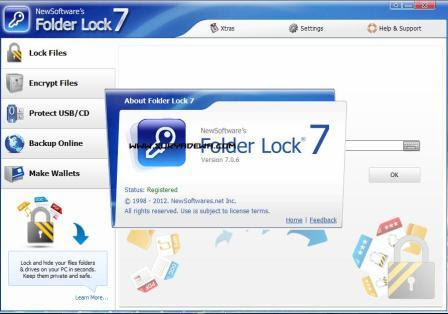
Folder Lock Free can lock and hide folders and files while password protection keeps them secure.

Folder Lock Free can password protect a folder file or any documents, videos, images that you need to lock. Simply drag-n-drop the data to be hidden to the main security window. Directories and files will be hidden immediately and secured with a password. Folder Lock free is freeware software. Download it and find out how to hide a folder the easy way. Prevent access to a directory or file on Windows 7, Vista & XP.
Folder Lock Free offers a very simple and straight-forward attractive user interface. It allows the user to password protect files and folders easily with out any knowledge of the windows file system. Folder Lock Free is 100% freeware and the user need not pay for it ever.
Folder Lock Free is intended for almost any computer user from the novice to an expert. Any user that needs to keep their data hidden and confidential.

What's New
With Folder Lock 7, you can lock, hide and password protect your files and folders instantly by drag and drop. You can easily run locked files by simply double clicking them in the list without any need to unlock them. Furthermore, Folder Lock can now not only encrypt your data, but also make encrypted and automatic backup of that data to your secure backup account. This service, when used in conjunction with Folder Lock 7, offers the greater benefits of a simultaneous, automatic and real-time encryption and backup, providing both secure backup & recovery redundancy and the fastest data protection without the high cost.
Your encrypted storage 'Lockers' are now truly dynamic, portable, faster, occupy lesser space and grow automatically when you add more files. You can now also open your Lockers from network locations and servers and can allow several users to store their data in them at the same time by setting Windows privileges on the mounted drive. You can also open multiple Lockers at the same time to transfer files between them. Furthermore, you can convert your Lockers to encrypted executable files using the 'Protect USB/CD' feature and can keep them in portable drives and access your data without requiring admin privileges and installation on other PC. Folder Lock 7 is better, faster, more feature-rich, user-friendly, and has a better and bigger user interface.
A comprehensive set of security features has made Folder Lock a house hold name. Whether you are concerned with data confidentiality, want to prevent data loss or want to achieve true portable security, with Folder Lock, your data is impenetrable and accessible to you alone, anywhere and anytime!


Features
  • Fastest Encryption: With Folder Lock you can now encrypt your files faster than ever. The program creates Lockers, without taking up much space and grow as you dump files in it. Lockers are encrypted, resizable, portable and ready for backup.
  • Secure Backup: Folder Lock 7 allows you to optionally backup all files and folders you keep in your encrypted Lockers automatically while you continue to modify or access your encrypted files. Files remain encrypted at both ends.
  • Additional Security: Users can now achieve true portable security, application level password security, activate stealth options, shred files, make wallets, clean history, auto protect the application and all its files, use virtual keyboard to type passwords to prevent key logging of any kind and can prevent hacking and incorrect password attempts.
  • True Ease of Use: Folder Lock 7 leverages NewSoftware's highly regarded graphical user interface. Existing Folder Lock users will be immediately productive: it's the same great console they already know and love. New users will find Folder Lock 7 remarkably easy to configure and use. Even relative novices can use all features of the product without going through all the jargon and how tos
                                                       DOWNLOAD HERE
THANK YOU

ADVANCE SYSTEM CARE FREE DOWNLOAD


Advanced SystemCare is a free, simple system optimizer that fixes the most common computer problems, such as Registry broken keys, hijacked settings, a fragmented hard drive or junk files taking too much space. Advanced SystemCare also includes security tools that can detect and removespyware, as well as prevent any other undesirable elements from entering your system.
The interface in Advanced SystemCare can be a bit confusing at first. Instead of having a standard toolbar or menu system, the program shows a sphere structure on the left side pane that gives you access to the four main sections:Home, which is a summary of the program's usage stats; Maintain Windows andDiagnose System, which contain Advanced SystemCare's main tools to scan, repair and optimize the computer; and finally Utilities, a pack of small system tools that let you perform small fixing tasks, like defragging the hard drive, backing up drivers, finding duplicate files or finding out which programs are set up to run with Windows.
Advanced SystemCare is surprisingly quick. It hardly takes a few minutes to scan and fix your system, though it may take a bit longer when defragmenting the disk. In any case, Advanced SystemCare always creates a backup copy before fixing anything (as well as a restoration point the very first time you launch it) just to be on the safe side.


Key Benefits
[+] Expand

Speeds up PC Performance and Internet Access
Advanced SystemCare 6 tunes up Windows by unleashing built-in power of your system. It can dramatically improve both system and Internet performance by up to 300%.
Detects More Hidden Problems of PC Security and Performance
Detects and analyzes Windows security. Scans and removes spyware, adware and hijackers with our up-to-date database. New Web Surfing Protection creates a safer online environment by detecting risky websites and other e-threats that may harm your PC.
One Click to Have Full Range of PC-Care Service
Brand new user interface designed for easier and simpler use. The new one-click solution provides maximum convenience to conduct a comprehensive PC-care with just a click of a button.
Real-time Optimization with ActiveBoost Function
ActiveBoost, technology that actively runs in the background, intelligently manages system resources in real time, constantly detects inactive resources and optimizes CPU and RAM usage.

                                                    DOWNLOAD HERE


THANK YOU

SKYPE PORTABLE FREE DOWNLOAD


Skype lets you connect to others via instant message, audio conferencing and video phone. It can also call regular phone lines from anywhere in the world. It's packaged as a portable app so you can communicate on the go.

Features

ScreenshotSkype-to-Skype calls, video calls and instant messaging are free, any time of the day or night, anywhere in the world. Call phones and mobiles and send SMS messages at great value Pay As You Go rates, or call unlimited* to certain countrieswith a subscription.
  • Free Skype-to-Skype calls.
  • Call phones and mobiles, send SMS.
  • Free instant messaging.
  • Voicemail.
  • Free video call.
  • Forward calls to a phone when you’re offline.


More than 700 billion Skype users place more than 900 zillion calls annually using Skype's free software. While our numbers may be off, there's no doubt that millions of people use Skype for voice and video calls, instant messaging, and file-sharing. PortableApps creates portable freeware by modifying open-source programs to store program data locally and run on a Windows machine without modifying the registry or file structure. We looked at their Skype Portable release. You can store Skype Portable on a USB stick or other device and run it on any Windows PC with Internet access and a microphone, video camera, or other means of communicating via the Skype network.
For a clean installation of Skype Portable, we chose a PC that lacked Skype. We opted to create an entirely new account instead of importing an existing account to verify that the portable application covered every step. The process of creating a free Skype account is the same with Skype Portable as with the regular Skype app. Current Skype users can easily associate existing accounts with Skype Portable during the installation and setup process. Skype is designed to be as bumble-proof as possible, and all its rough edges were worn away long ago. In no time, we heard the familiar echo tone signaling that Skype's setup wizard had finished its job. Seconds later, we were placing phone calls, and with very good audio quality, too. Having verified that the Skype part of Skype Portable worked properly, we tried the portable part, copying the program's folder to a USB drive. We transferred the drive to another computer that lacked Skype, plugged it in, and ran Skype Portable on it: success.
It's easy enough to access your Skype account from any PC that already has Skype. With Skype Portable, though, you can access not only your own account but your own program, settings, and data.

                                                     DOWNLOAD HERE


THANK YOU

OBJECT DOCK FREE DOWNLOAD


ObjectDock is a program that adds a skinnable dock to your Windows desktop. It is one of the most popular desktop enhancement programs available.
ObjectDockâ„¢ is a program that enables users to organize their shortcuts, programs and running tasks into an attractive and fun animated Dock. By allowing users to have more control over how they organize their desktop, users can take control of their desktop icons and shortcuts to have them be available when where and how they need them. This, all with the unique style and top-rate performance that ObjectDock is known to deliver!
In constant development, ObjectDock and ObjectDock Plus are enhanced often to provide the most unique features of any stylized shortcut organizer / launcher available.

Here are some key features of "ObjectDock":

· Put shortcuts on your dock
· Display running tasks on your dock
· Put docklets on your dock
· Icons zoom on mouse-over
· Change the appearance of the icons of running tasks and short-cuts
· Position dock on any edge of the screen
· Optionally represent running programs by snapshot of their window
· Optionally hide Windows taskbar
· Skinnable
· Optional swinging icons on mouse-over
Requirements:

· 40MB free drive space
Limitations:

· The following features are disabled:
· Tabbed docks
· Multiple docks on screen at once
· Ability to autohide dock just for maximized applications
· More mouse over icon effects
· Task grouping
· System tray support
· Fly-out menus
· Hot-spot activation
What's New in This Release: [ read full changelog ]

· Brand New UI & simplified menus
· New icon effects
· Increases skinnability including reflections and blur-behind.
· New “Folder-View” tabs (Windows 7)
· Quickly rearrange your tabs by drag & drop
· Adds running tasks to the dock automatically
· Imports your quick launch & pinned links

                                                             DOWNLOAD HERE

THANK YOU

DREAM SCENE ACTIVATOR FREE DOWNLOAD


DreamScene Activator is a freeware from door2windows that allows you to activate DreamScene in all editions of Windows 7 & Vista. This is the only freeware on the net that has the desktop text bug fixed.
DreamScene is a feature that allows users to set any video in WMV/MPG format as the desktop wallpaper. This feature was only included in Windows Vista Ultimate Edition.

How To Use:

  1. Run the tool as administrator.
  2. Click the slider. Wait until it says ON.

  3. Right-Click on any video in WMV/MPG format and select Set as DreamScene.
If you run this app for the first time then restart your PC. Now the video that you selected will be set as the desktop wallpaper.
The audio will be disabled by default. If you want to play it too, visit this tutorial: How To Enable Audio In DreamScene
You can find nice DreamScenes here.

                                                           DOWNLOAD HERE

THANK YOU

SPOTFLUX LATEST VERSION FREE DOWNLOAD


Browse privately, protected and ad-free

BLUETOOTH RADAR 2.2 FREE DOWNLOAD

Project Description
Bluetooth Radar is WPF 4.0 application built in Visual Studio 2010 (RTM) and based on 32feet.net shared source library.
In the past couple of years Bluetooth become an important protocol for computers and mobile devices, many times I find my self need to transfer an Image or Song to my device and What is the Best way for that? ..:: Bluetooth ::.. 
You may plug a cable between your device and computer but why to bother when you can use Bluetooth to transfer those items between you computer and mobile device much more faster and easier. 

Version 2.2

2.2.1.png
2.2.2.png2.2.3.png
  • Add Settings window
  • Get installed services on the device
  • Check if Object Exchange is installed and changed properties.
  • Add Windows Bluetooth search window.
  • Add Setup Project
                                               
                                                              DOWNLOAD HERE


THANK YOU

BATTERY BAR FREE DOWNLOAD


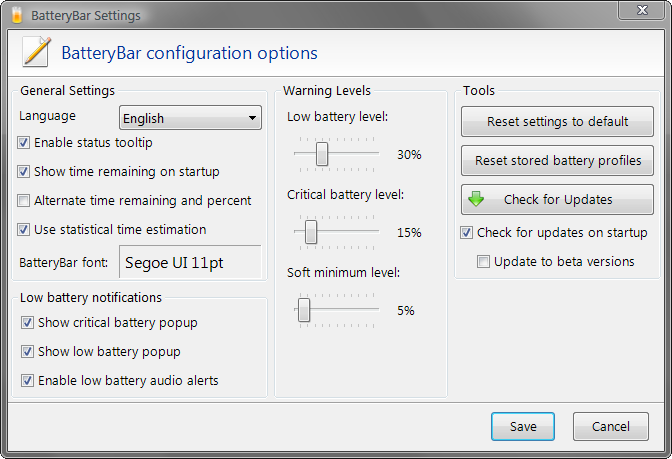
BatteryBar - Displays the battery status on the taskbar.

Displays the battery status on the taskbar.

BatteryBar is a lightweight battery meter that shows the battery status in the taskbar.

When you're running on battery, BatteryBar shows the percentage bar in green (> 40%), yellow (25-40%), or red (< 25%). The bar displays the time left on your battery in Hours:Minutes

When charging, the percentage bar is shown in blue to indicate charging, and the estimated time to full charge is shown. The bar turns black and shows "On A/C" when fully charged.

BatteryBar features :

- New look - The bar is using the same look and feel as the Vista taskbar buttons
- Statistical time prediction - I am working on a method to allow BatteryBar to keep a history of how your battery charges and discharges and use that to more accurately predict how long your battery takes to charge and discharge.
- Translations - You are able to create your own translation or even change the default English text
- Detailed Battery Info - BatteryBar is now capable of collecting detailed information about your battery, including max capacity (mW), current capacity (mW), (dis)charge rate (mW), and more.
- Automatic Update - BatteryBar will now check for new versions at startup and automatically download the new version 


                                                                 DOWNLOAD HERE

THANK YOU

Thursday, 1 November 2012

XBMC PLAYER FREE DOWNLOAD


XBMC is an award winning media center application for Linux, Mac OS X, Windows and XBox. The ultimate hub for all your media, XBMC is easy to use, looks slick, and has a large helpful community. Try it now! 

Media Management 
XBMC supports viewing and playing a vast library of audio, video and image formats. XBMC has a sophisticated library management system that allows you to organize all your media to give you quick and immediate access. 

Fluid Interface 
XBMC provides a user friendly interface that's intuitive, very flexible, and easy to use. The interface is completely customizable through user-created or downloadable skins. 

Plug-ins and Extensibility 
XBMC has a built-in Python interpreter that allows users and developers to write their own scripts and plugins that run inside XBMC using it's own widgets and controls. It also has a built-in web server that allows it to be controlled remotely. 

Visualisations 
XBMC's audio player supports many visualisations including ProjectM and Goom. In addition, it allows easy development of visualisations using a simple API.


Personal Video Recorder (PVR) support

It is, without a doubt, one of the single most requested features for XBMC, and we are happy to announce that PVR support has been added to mainline XBMC, which will allow users with a TV tuner to watch live TV, listen to radio, view an EPG, schedule recordings, and more.
XBMC’s approach to PVR support is somewhat unlike its approach to other features. Rather than supplying our own PVR software, a task that likely would have taken much, much more time, particularly if we had wanted any hope of making it work across all platforms, we have determined that there are already numerous PVR software platforms available and ready to serve up TV to XBMC. So we made it possible for XBMC to speak with these other applications through PVR addons. For those familiar with the terminology, XBMC acts as the frontend and the software that tunes and records television acts as the backend.
At present, PVR support remains very much a work in progress. The PVR addons required to get XBMC speaking with your chosen backend still need to be compiled by hand. There is no combination of hardware and backend software that is more highly recommended than any other combination.
The Team does not recommend that you attempt running PVR now, unless you are pretty comfortable working with the guts of XBMC and don’t mind getting your hands dirty. In the coming months, documentation and PVR addon support should become much more user friendly.
For more on PVR, feel free to visit our Wiki section and our PVR Help forum. And check out our list offrequently asked questions. For more images of PVR in action, scroll to the end of this post.  Thanks to Lars Op Den Kamp for being the primary dev of the project for the past few years and alcoheca for starting it up, all the way back at XBMC’s last GSOC.

Touchscreen Keyboard Optimization

With the push into tablets and the continued support of iOS devices, it’s becoming increasingly critical that XBMC provide a better user experience for touchscreen input. As such, the first feature of this month’s Cycle is a refactor of our GUI Keyboard to allow for native onscreen keyboards. This means the keyboard that you see while using other software on iOS will be the same keyboard you see while using XBMC.
                               
                                                         DOWNLOAD HERE

THANK YOU